Gemgala Withdrawal Information
All of your hard work on Gemgala can be easily withdrawn with these simple steps.
Read Withdrawal TutorialWithdrawal Requirements
Prerequisites before submitting your withdrawal
Link a Withdrawal Account
You must link a MetWallet account to Gemgala before able to withdraw
Meet the Minimum Amount
You must at least have $10 or 100.000 Gems in your account
How to Link MetWallet Account
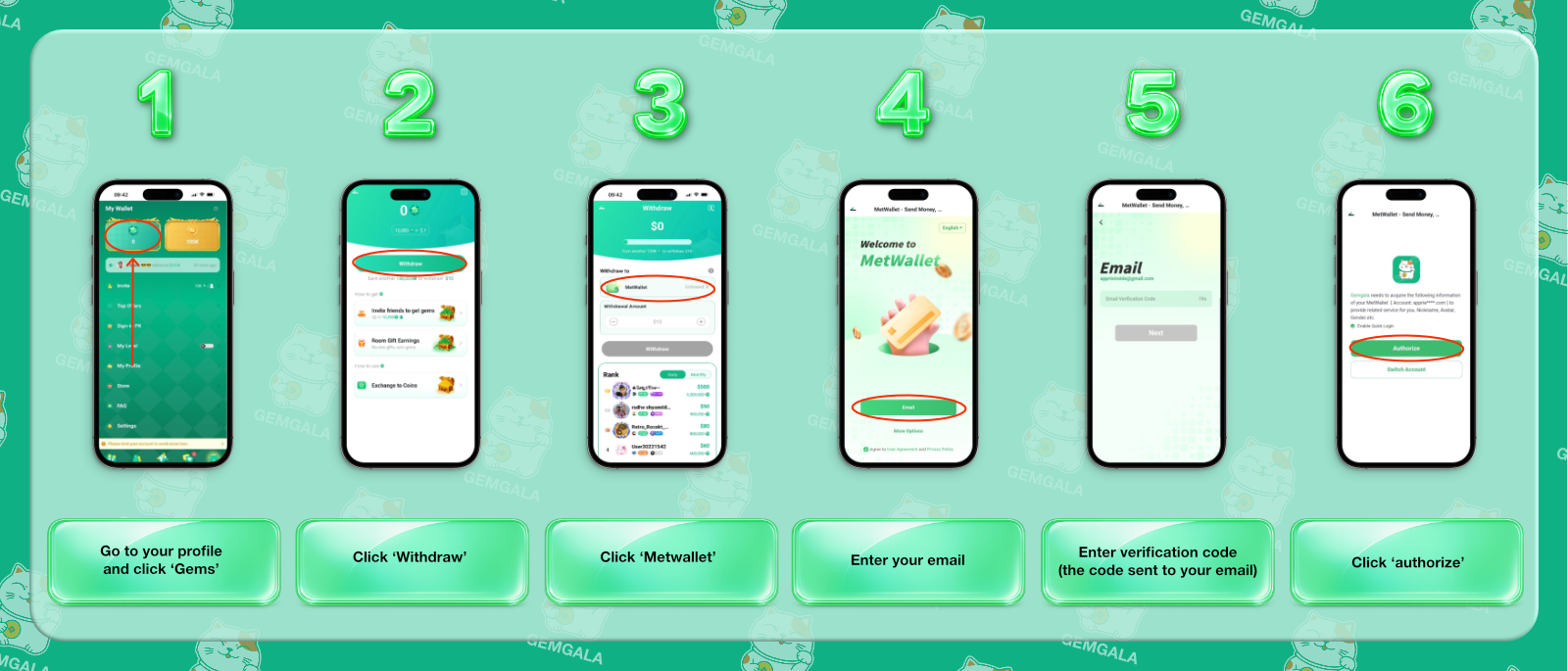
Follow these 6 simple steps to bind your wallet
Step 1: Open “Gems” menu
Go to your Gemgala profile and select Gems.
Step 2: Select Withdraw
From the Gems section, choose Withdraw.
Step 3: Choose MetWallet
Select MetWallet from the available withdrawal options shown in the tutorial.
Step 4: Enter Your Email
Enter your MetWallet email address requested during the process.
Step 5: Enter the Verification Code
Gemgala will ask you to enter the verification code sent to your email.
Step 6: Authorize the Connection
Select “Authorize” to complete the wallet binding process.
6-Step MetWallet Binding Visual Diagram
Frequently Asked Questions
Gemgala uses MetWallet to process all the withdrawal on the platform. For more information regarding what banks, methods, or currency available, please check the MetWallet website.
Open your Gemgala profile, select Gems, and then select Withdraw.
Yes. Gemgala require your MetWallet email address.
Please try again in a few minutes. Contact us if you're having a problem receiving the verification code.
Contact our team if you're having a problem regarding the withdrawal process.
Have More Questions Regarding Withdrawal?
Contact our team right here and we will help solve your earnings withdrawal problem.
Contact Our Team