How to Join Gemgala Step by Step
New to Gemgala? We will walk you through the complete account setup process, from downloading the application to completing your profile.
Start Your Registration ProcessGemgala Registration Steps
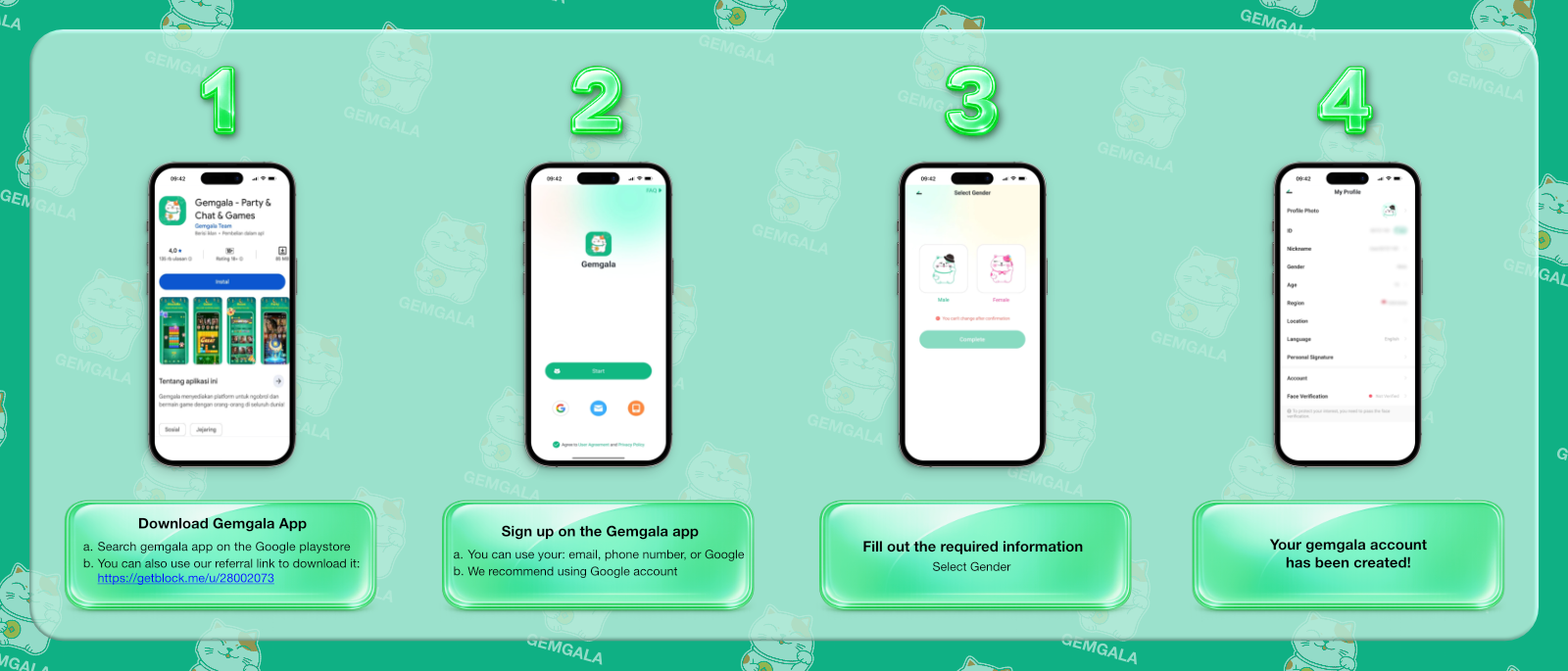
Step 1: Download the Gemgala App
First, you can search for Gemgala on the Google Play Store. Alternatively, we recommend you to use our agency referral link to access our official agency directly.
Step 2: Sign Up for Gemgala
Next, you can register via email, phone number, or Google account.
Step 3: Enter Your Gender
Then, choose your gender. Remember you can not change your gender later.
Step 4: Add Your Profile Photo
Once you enter the app, click: open your profile → “My Profile” → “Profile Photo”.
What’s Next Step?
Once your Gemgala account is ready, you can choose what you want to do next.
You can simply use Gemgala as a user, learn about becoming a host, or explore the Gemgala agent system.
Gemgala Host
Learn more about livestreaming and earning rewards.
Gemgala Agent
Learn about agency system and commissions.
Gemgala Earnings
Learn how host and agent earnings work.
Frequently Asked Questions
Registration & Account Setup Questions
You can register using an email address, phone number, or Google account.
Yes. We recommend using a Google account.
Yes. Gemgala will ask for a face verification when you're performing or interacting with features that require it. You can not complete or ask for a verification before that.
No. You will be unable to change your gender after the registration is finished.
Yes. After completing verification, the tutorial shows an option to take a new photo or upload an existing photo.
Create Your Own Gemgala Account
Contact us and join through our referral link and start exploring, earning, or building a team on Gemgala.
Contact Our Team Now